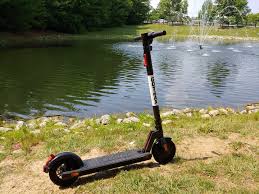
Gotrax scooters are popular entry-level electric scooters that come with a built-in speed limiter from the factory, typically capping the top speed at around 15–20 mph depending on the model.
This limiter is enforced either through the controller firmware, a P-settings (parameter settings) menu, or a physical speed-limiting wire. This guide covers all three methods.
What you’ll need
Method 1: P-settings (firmware parameter menu)
Most Gotrax models expose a hidden “P-settings” menu via the display panel. This is the safest and most reversible method.
- Power on the scooter
Turn on your scooter normally using the power button. Make sure the battery is above 20% before starting.
2. Enter the P-settings menu
Press and hold the power button and the brake/mode button simultaneously for 5–8 seconds until “P1” or “P01” appears on the display.
The exact combination varies by model, so consult your manual if this doesn’t work.
3. Navigate to the speed setting
Use the throttle or mode button to scroll through parameters. Look for P1, P2, or P3 on most Gotrax models. P1 controls the speed limit. The value is usually displayed as a number from 1–5 or a percentage.
4. Increase the speed parameter
Press the brake button (or + button on models that have one) to increase the value to its maximum. On most Gotrax GXL V2 and APEX models, setting P1 to 5 removes the software speed cap entirely.
5. Save and exit
Hold the power button again to save the setting and return to the main screen. Power cycle the scooter (turn off and on) to apply the change.
Model-specific note: The Gotrax GXL V2 uses P1 for speed; the APEX and APEX XL use P3. The G4 and G5 Pro models may require a firmware reset via the app. Always verify using your model’s specific documentation.
Method 2: Removing the speed-limiting wire
Some older Gotrax models (especially pre-2021) include a physical yellow or white wire connected to the controller that artificially limits speed. Cutting or disconnecting this wire can remove the hardware-level restriction.
- Power off and remove the deck panel
Turn off the scooter completely and disconnect it from charging. Use a Philips screwdriver to remove the screws on the underside of the deck and carefully lift the panel to expose the wiring and controller.
- Locate the controller box
The controller is a small black or grey rectangular box usually located near the center or front of the deck. It will have multiple wire harnesses plugged into it.
- Identify the speed-limit wire
Look for a single yellow or white wire that connects to the controller and terminates in a loop or connects back to itself (or to the frame). On some models, it will be labelled. This is the speed limiter signal wire.
- Disconnect or cut the wire
Gently unplug the connector if it has one. If it’s a direct wire, use wire cutters to snip it, then wrap both exposed ends securely with electrical tape to prevent any short circuits.
- Reassemble and test
Replace the deck panel and all screws. Power on the scooter in a safe, open area and gradually test the new top speed. Do not immediately attempt full throttle; test incrementally.
Safety warning: Cutting the wrong wire can permanently damage the controller or battery management system. If you are not confident in identifying the correct wire, use Method 1 (software) or consult a professional e-scooter technician instead.
Method 3: Using the Gotrax app (newer models)
The Gotrax G4, G5, and some GXL Pro models support Bluetooth connectivity via the Gotrax app (available on iOS and Android). The app exposes speed settings directly.
- Download the Gotrax app
Search “Gotrax” in the App Store or Google Play and install the official app. Create an account if prompted.
- Pair the scooter via Bluetooth
Power on the scooter and open the app. Tap “Add Device” and follow the pairing instructions. The scooter’s Bluetooth typically activates automatically when powered on.
- Navigate to speed settings
Once connected, go to Settings → Ride Mode or Advanced Settings. You should see a “Max Speed” or “Speed Limit” slider.
- Adjust and save
Drag the slider to the maximum permitted value and tap Save. The app will push the setting to the scooter’s firmware in real time.
Method 4: Full Electronic Component Upgrade
If you’ve made it this far and you’re still not satisfied, there is one more option on the table. You can strip out the Gotrax scooter’s motor, controller, and battery entirely and replace them with higher-performance aftermarket components.
Essentially, you’d be keeping the scooter’s frame and rebuilding everything inside it from scratch.
We’re talking a custom brushless motor with a higher KV rating, a beefier controller that can handle more voltage, and a larger battery pack to feed the whole system.
Sounds exciting, right?
Here’s the thing though. By the time you price out a quality motor, a compatible controller, a lithium battery pack with enough capacity to make the upgrade worthwhile, and all the wiring and connectors to tie it together, you’re easily looking at $400 to $800 or more in parts alone.
And that’s before factoring in the hours you’ll spend sourcing compatible components, figuring out whether they’ll actually fit the frame, and troubleshooting whatever inevitably goes wrong on the first test ride.
At that point, you have to ask yourself an honest question: why?
For that same budget, you could walk away with a purpose-built performance scooter that already does everything you’re trying to achieve, comes with a warranty, has proper safety certifications, and doesn’t require you to become an amateur electrical engineer on the weekend.
One great example is the YUME scooter. These ones come with a key knob that limits the scooter to the legal 25km/h and derestricts it in a single click to enjoy the thrill of the maximum speed.
After removing the limiter: what to expect
Depending on your model and battery health, removing the limiter can increase your top speed by 3–8 mph. Keep in mind:
Battery drain increases significantly
Riding at higher speeds consumes more power. Expect noticeably reduced range — sometimes 20–40% less per charge.
Motor and controller wear
The motor and controller were designed to operate within factory parameters. Running consistently at higher loads will accelerate wear and may shorten component lifespan.
Braking distance increases
At higher speeds, the existing brakes may require more distance to stop safely. Inspect your brake pads and consider upgrading them if you plan to ride frequently at higher speeds.
Legal reminder
In many jurisdictions, electric scooters are legally limited to 15–20 mph on public roads or paths. Exceeding these limits can result in fines or make you liable in case of an accident. Always check local laws before riding a de-limited scooter on public roads.