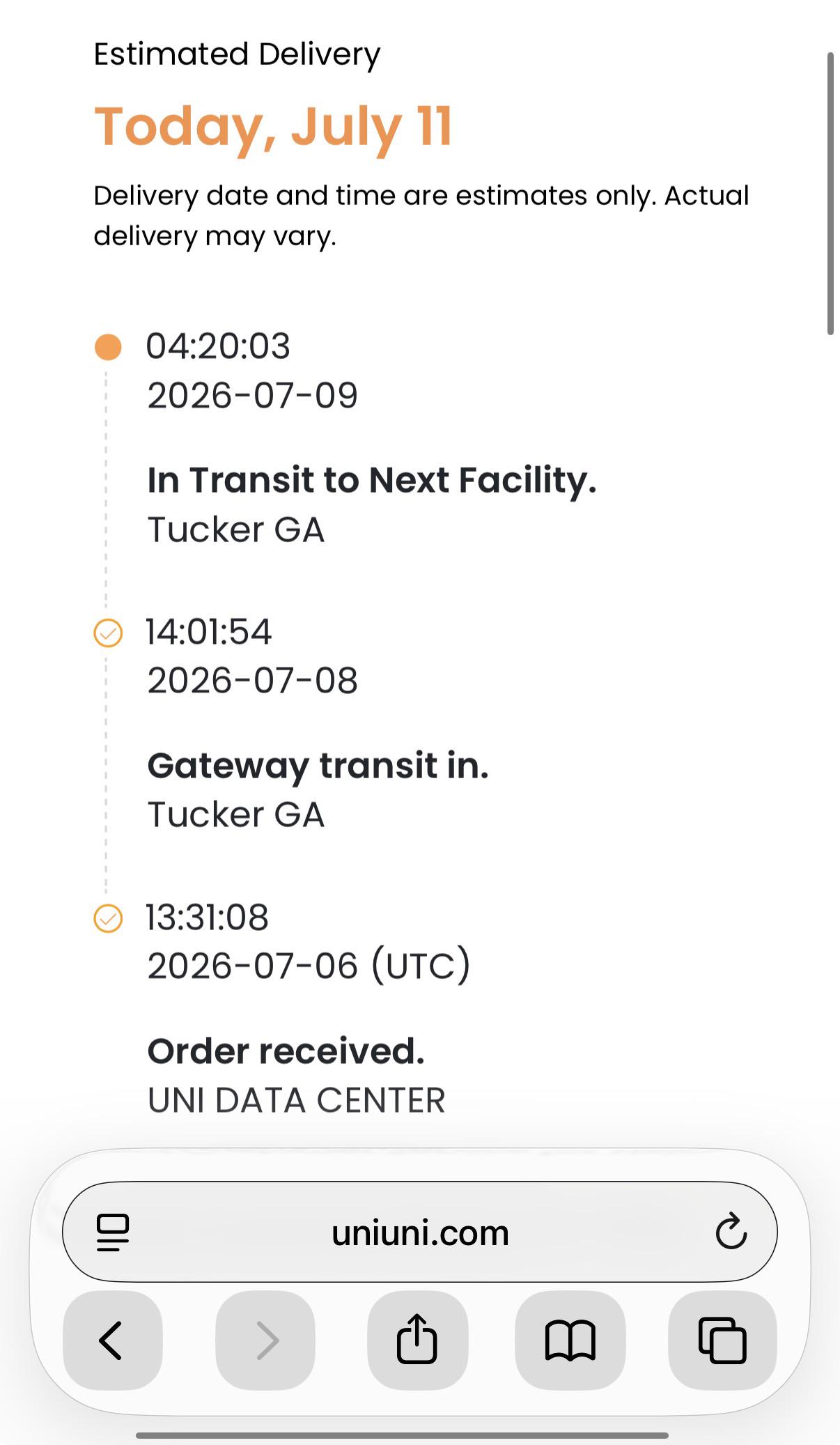
If you have been watching your UniUni tracking page and suddenly saw the status change to “Gateway Transit In,” you are probably wondering whether that is good news, bad news, or just another confusing checkpoint in a long shipping journey.
This guide breaks down exactly what the status means, why it appears, how long it usually lasts, and what to actually do if your package seems to sit there longer than expected.
What Does Gateway Transit In Mean On UniUni?
Gateway Transit In means your package has arrived at one of UniUni’s major gateway facilities and has been scanned into that hub.
A gateway facility is a large sorting center, often located in a major metro area, where UniUni receives high volumes of parcels before sorting and routing them onward to regional or local delivery hubs.
In plain terms, this status confirms three things:
- Your package has physically reached a key sorting point in the UniUni network
- The parcel has been scanned in and logged into the system at that facility
- Your shipment is being queued for the next stage of processing before it heads toward your area
It is common to see the “Gateway Transit In” status appear more than once for the same package. UniUni operates over 100 facilities across North America, and a single shipment can pass through several gateway and sorting hubs before it reaches your local delivery area.
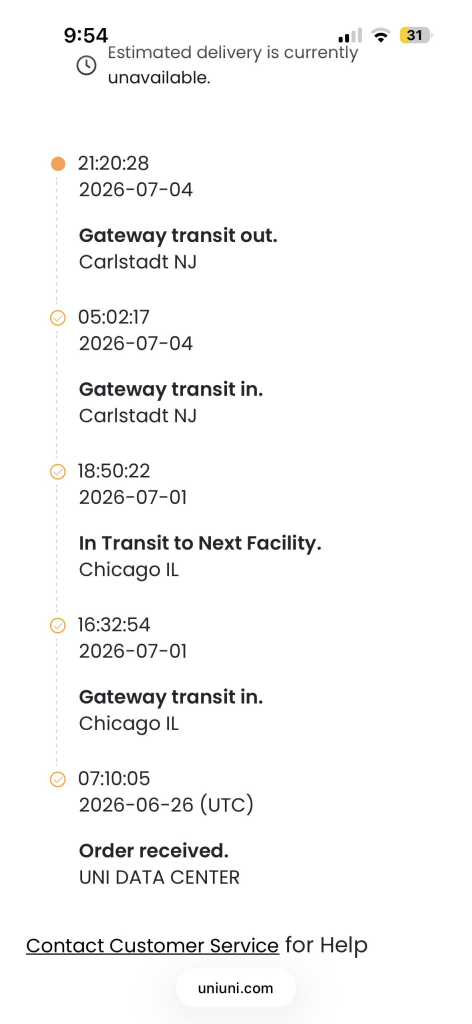
Each time the package checks into a new facility along that route, the tracking page may log another “Gateway Transit In” update.
Seeing this status repeat is not a sign of a problem or a routing mistake. It simply reflects the normal path a parcel takes as it moves between regional hubs on its way to the facility closest to your address, where it will eventually go out for delivery.
This status is sometimes shown in system logs as GATEWAY_TRANSIT_IN, which is the same event just written in a more technical format.
You may also see closely related wording such as “Arrival scan,” “Arrived at Facility,” “Arrived at hub,” or “Parcel Arrived at UniUni Warehouse.”
These all describe the same general milestone, which is your package checking into a sorting facility.
Where Gateway Transit In Fits In The Shipping Journey
UniUni packages generally move through a predictable sequence of checkpoints. Understanding where Gateway Transit In sits in that sequence helps explain why it shows up and what normally comes next. We have an entire article about all these statuses.
- Label created or shipment information received
- Package picked up from the seller or received by carrier
- In transit between facilities
- Gateway Transit In, meaning the package has arrived at a major gateway hub
- Sorting and processing at that gateway facility
- Gateway Transit Out, meaning the package has left the gateway and is heading to a local delivery facility
- Arrived at local facility or driver sorting
- Out for delivery
- Delivered
Gateway Transit In is essentially the midpoint of a longer journey. For packages coming from overseas sellers or cross border marketplaces, this status often appears right after the international leg of the shipment clears customs, marking the moment the parcel formally enters UniUni’s domestic sorting network for the first time.
Why Your Package Might Sit At Gateway Transit In For A While
Seeing the same status for a day or two after Gateway Transit In appears is completely normal, and here is why.
Gateway facilities handle enormous volumes of parcels every day, often tens of thousands passing through a single hub.
Once a package is scanned in, it enters a processing queue where it gets sorted by destination, grouped with other packages heading the same direction, and prepared for the next leg of transport.
A few specific reasons your package might pause at this stage include:
- High volume periods. During major shopping seasons or promotional sales windows, gateway hubs receive a surge of parcels that can slow down sorting times industry wide.
- Automated and manual sorting steps. Not every package moves through a gateway purely on automated equipment. Some require manual handling, which naturally takes longer.
- Consolidation before onward transport. Carriers often wait to build a full truckload or shipment batch heading to the same regional hub before dispatching it, rather than sending out partial loads constantly.
- Label or scan issues. Occasionally a package with a damaged label, low print quality, or a barcode that is hard to read can cause a short delay while staff manually verify the shipment.
- Address or documentation review. If there is an inconsistency in the address details attached to the shipment, some gateways will hold the parcel briefly while that information gets confirmed.
None of these situations mean your package is lost. They simply reflect the reality of moving high volumes of parcels through a shared logistics network.
How Long Does ‘Gateway Transit In’ Usually Last
For most shipments, Gateway Transit In lasts somewhere between 1 and 3 days before the status updates again, typically to Gateway Transit Out or a related “departed facility” style status.
During particularly busy periods, this window can stretch to 5 or even 7 days and still fall within a normal range for high volume shipping windows.
If your tracking has shown no movement for more than a week after Gateway Transit In first appeared, that is generally the point where it becomes reasonable to check in with the seller or reach out to UniUni support directly, rather than continuing to wait.
‘Gateway Transit In’ Versus ‘Gateway Transit Out’
These two statuses are easy to mix up since the wording is so similar, but they represent opposite ends of the same event.
Gateway Transit In means the package has arrived at the gateway facility and is being received into the system.
Gateway Transit Out means the package has finished processing at that gateway and has left the facility, now heading toward a regional or local hub closer to the delivery address.
Think of Gateway Transit In as check in and Gateway Transit Out as check out. Both are positive signals that your package is progressing through the network as expected.
Is Gateway Transit In A Sign Of A Problem?
No. On its own, Gateway Transit In is one of the more reassuring updates you can see, since it confirms your package has reached a real, physical checkpoint in the delivery network rather than sitting unprocessed somewhere with no visibility at all.
Delays only become a genuine concern if the status remains completely unchanged well beyond the typical 3 to 7 day window, especially if it happens alongside other warning signs such as an address exception or a delivery hold notice appearing separately in your tracking history.
What To Do If Gateway Transit In Seems Stuck
If your package has been sitting at this status longer than expected, work through these steps in order.
- Give it time first. Wait at least 3 to 5 days before treating the status as a genuine delay, since gateway processing naturally takes time.
- Check your tracking number on multiple platforms. Cross-referencing your tracking number on the official UniUni tracking page as well as a third-party tracker can sometimes surface more recent scan data.
- Confirm your delivery address is correct. Log into the account you ordered through and double-check every detail, since even small address errors can cause a hold at the gateway stage.
- Review your estimated delivery date. A single day or two of no movement rarely changes the overall delivery window, so check whether your estimated date has shifted before assuming something is wrong.
- Contact the seller if there has been no update at all since pickup. They may have visibility into backend logistics information that is not shown on the public tracking page.
- Contact UniUni support directly if the status has not changed for 7 to 10 days or longer, and have your tracking number ready when you reach out.
Final Thoughts
Gateway Transit In is one of the clearest and most normal checkpoints you will see on a UniUni tracking page. It confirms your package has physically reached a major sorting hub and is being processed for the next leg of its journey.
A short pause at this stage is expected, especially during busy shipping periods, and does not mean your package is lost or stuck. If the status genuinely stalls well past the typical window, following up with the seller or UniUni support is the right next step to get clarity on where your package actually stands.