A USPS tracking number is the single piece of information that connects you to everything happening with your package, from the moment a shipping label is created to the second it lands on your doorstep.
Yet most people only look closely at a tracking number when something feels wrong, when a delivery is late, or when a status update seems confusing.
This guide covers the entire subject in depth: what a USPS tracking number looks like, how the different formats and prefixes work, every way you can actually track a package, what each tracking status means, and what steps to take when tracking stalls or a package appears to be lost.
What Is a USPS Tracking Number?
A USPS tracking number is a unique identifier assigned to a mailpiece or package at the point it enters the USPS system.
It works like a serial number, allowing USPS scanning equipment at processing facilities, distribution centers, and delivery units to log the location and status of that specific item at every stage of its journey.
Not every piece of mail gets a tracking number. Postcards and standard First Class Mail letters sent without any additional services generally do not include tracking.
Most package services, including Priority Mail, Priority Mail Express, Ground Advantage, and Certified Mail, include tracking either as a built-in feature or as an add-on service purchased at the counter or through online postage.
USPS Tracking Number Formats Explained
USPS tracking numbers are not random strings of digits. They follow structured formats that vary depending on the mail class and service used. Understanding these formats can help you quickly identify what kind of shipment you are dealing with.
Domestic Tracking Numbers
Most domestic USPS tracking numbers are purely numeric and range from 20 to 22 digits long. The most commonly seen format is a 22 digit number, and it is standard practice for USPS and shippers to display it broken into groups for readability, for example 9400 1000 0000 0000 0000 00.
When entering a tracking number into a search box, spaces do not matter and can be left in or removed.
The leading digits act as a service identifier, giving a rough indication of the mail class being used. Commonly reported prefixes include:
- Numbers beginning with 9400 are generally associated with Ground Advantage and other standard package tracking
- Numbers beginning with 9205 are commonly linked to Priority Mail
- Numbers beginning with 9270 typically indicate Priority Mail Express
- Numbers beginning with 9407 are usually associated with Certified Mail
- Numbers beginning with 9208 or similar 92 series prefixes can also appear on Priority Mail and related services
It is worth noting that USPS does not publish a single definitive public list mapping every prefix to every service, and different third-party shipping resources sometimes describe these prefixes slightly differently.
The safest way to identify a package’s service level is not to rely purely on the prefix, but to look at the full tracking result on USPS.com, which will state the mail class directly.
The final digit or digits of a domestic tracking number typically function as a check digit, used internally by USPS systems to catch data entry errors before a search is even run.
This is one reason a single mistyped digit will often return no result at all, rather than the wrong package.
Priority Mail Express and International Tracking Numbers
Priority Mail Express and most international USPS services use a different, shorter format based on the international S10 standard set by the Universal Postal Union.
This format is 13 characters long and follows a consistent structure: two letters, followed by nine digits, followed by two more letters, with the final two letters almost always being “US” to indicate the country of origin. An example pattern looks like EA 000 000 000 US.
The two letters at the start of this format act as a service indicator. Different letter combinations are used across the international postal network to represent different classes of mail, which is why you may see prefixes such as EA, EC, or CP depending on the exact service used.
Certified Mail and Other Special Services
Certified Mail tracking numbers generally fall in the 20 to 22 digit range as well, often beginning with a 70 or 94 series prefix depending on when and how the label was generated.
Signature Confirmation and Registered Mail have their own numbering conventions, but are tracked through the same USPS Tracking system as every other service.
How to Tell if a Number Is a USPS Tracking Number
If you are unsure whether a tracking number belongs to USPS or a different carrier, a few quick checks help:
- Check the length. USPS domestic numbers are typically 20 to 22 digits and purely numeric. UPS numbers start with “1Z” and run 18 characters. FedEx numbers are commonly 12 or 15 digits.
- Check for letters. A domestic USPS number should contain no letters at all. If you see letters mixed into a long numeric code, it is more likely FedEx, UPS, or a marketplace logistics number, such as Amazon’s “TBA” prefixed codes.
- Check for the “US” ending. A 13-character code ending in “US” strongly suggests an international USPS or Priority Mail Express number.
- Try it directly on USPS.com. If the tracking system recognizes the number and returns a result, it confirms both the carrier and the format.
Where to Find Your USPS Tracking Number
Your tracking number can typically be found in several places, depending on how the package was shipped:
- On the physical shipping label itself, usually printed above or below the barcode
- On the retail receipt if the package was mailed at a Post Office counter
- In the shipping confirmation email if the label was purchased through Click-N-Ship or an online retailer
- Inside your USPS.com account dashboard if you created an account while purchasing postage
- On a redelivery notice, known as PS Form 3849, which includes a barcode number that can be searched the same way as a standard tracking number
If you never received a tracking number and you are the recipient rather than the sender, USPS customer service and local Post Office staff are not able to look one up or recover it on your behalf.
The number has to come from whoever created the shipping label. This is one of the reasons Informed Delivery, covered further below, has become a popular workaround for recipients who want visibility over incoming packages without needing the tracking number at all.
Every Way to Track a USPS Package
USPS Tracking is available through several different channels, and all of them draw from the same underlying tracking data, so the information will be identical no matter which method you use.
Track Online at USPS.com
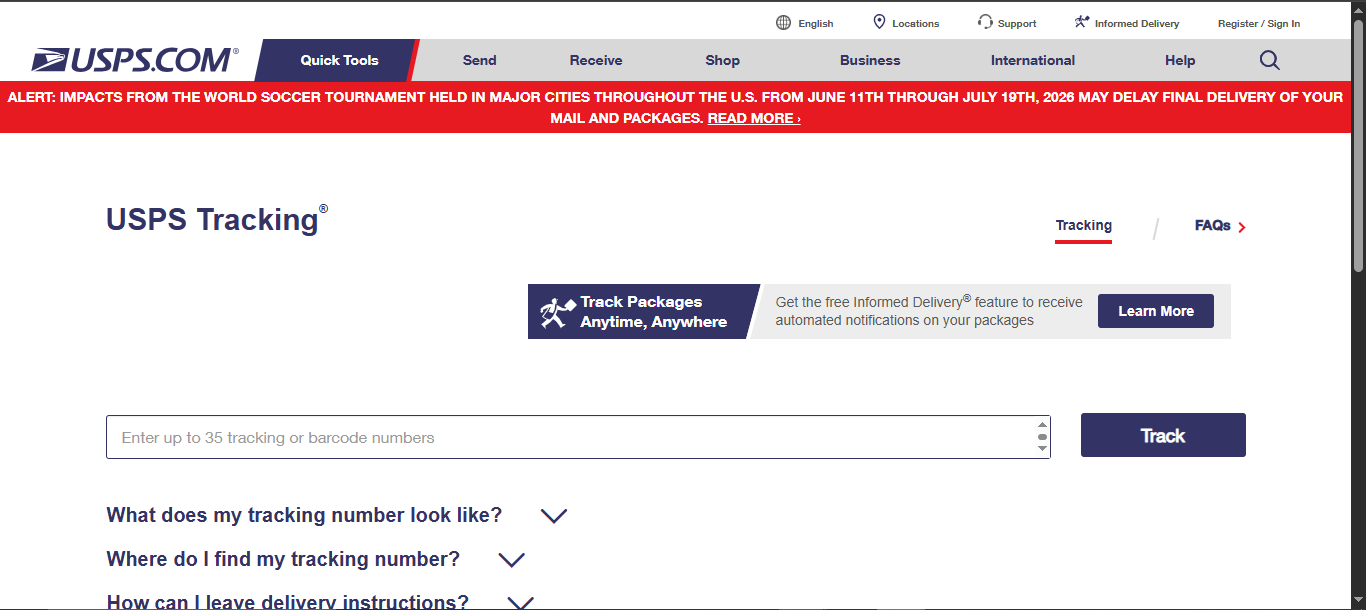
The most common method is entering the tracking number directly into the USPS Tracking tool on USPS.com.
This returns the current status, the most recent scan location, an estimated delivery date where available, and the full scan history for the item.
From this page you may also be able to access Delivery Instructions, request Redelivery, or sign up for automatic status notifications, depending on the service and status of your package.
Track by Text Message
USPS offers text tracking by sending a text message to 28777, which spells out “2USPS” on a phone keypad. The tracking number should be sent as the entire content of the message.
Standard messaging and data rates from your mobile carrier may apply. This method is useful when you want a quick status check without opening a browser or app.
Track Through the Informed Delivery Dashboard
Informed Delivery is a free USPS service that shows a digital preview of incoming mail and automatically displays tracking information for most domestic packages addressed to your account address, without you needing to manually enter each tracking number.
This is particularly useful for recipients who are waiting on a delivery but were never given the tracking number directly, since qualifying packages tied to your address will often appear automatically.
Track by Phone
Package status can also be checked by calling USPS customer service and providing the tracking number verbally.
This is a helpful option for anyone who prefers speaking with a representative or who does not have reliable internet access at the time.
Email and Text Notifications
Rather than checking manually, you can request automatic email or text updates tied to a specific tracking number directly from the tracking results page.
These notifications typically remain active for two weeks from the date they are requested, and they stop automatically once the package is marked delivered.
If you stop receiving updates, it usually means there have been no new scans yet, rather than a technical failure, so it is worth checking the tracking page directly to confirm.
Tracking a USPS Package Through Third-Party Sites
Beyond USPS.com, a number of third-party tracking platforms let you follow the same tracking number and sometimes surface details the official USPS tracker can miss or display less clearly.
Sites such as 17Track, AfterShip, ParcelsApp, Ship24, and TrackingMore pull directly from USPS data but also cross-reference other carriers in the shipping chain, which matters for packages that start with an overseas postal service or a marketplace logistics network before USPS takes over for final delivery in the United States.
Because these platforms aggregate data from thousands of carriers worldwide, they can piece together a fuller timeline for international or cross-border orders, showing the handoff points between the originating carrier and USPS that the USPS tracking page alone will not display.
Several of these tools also offer features USPS does not, including combined tracking for multiple packages from different carriers on one dashboard, browser, and app push notifications, delivery predictions based on historical data, and simple carrier detection if you are not sure which company a tracking number belongs to.
That said, these platforms are not official USPS services, so for anything involving a dispute, a lost package claim, or insurance, the tracking history on USPS.com remains the authoritative source, and third-party sites should be treated as a helpful supplement rather than a replacement.
Understanding USPS Tracking Statuses
USPS tracking statuses can look cryptic if you do not know what each one is describing. Below is a breakdown of the most common statuses you are likely to encounter, roughly in the order a package usually moves through them.
Label Created / Pre-Shipment
This means a shipping label has been generated but USPS has not yet physically received the package. At this stage, the sender still has the item in their possession. Sellers sometimes create labels in batches ahead of the actual drop off, so this status can persist for a day or two before the first real scan appears.
Acceptance / Accepted at USPS Origin Facility
This is the first scan confirming USPS physically has the package, and it has entered the mail stream.
In Transit / Arrived at USPS Facility / Departed USPS Facility
These statuses indicate normal movement through the USPS network as the package passes through regional hubs and processing centers on its way to the destination area.
Seeing the same general status for a day or two, especially over a long-distance route, is normal and does not necessarily indicate a problem, since not every leg of a journey generates a fresh scan.
Out for Delivery
The package has reached the local Post Office responsible for the final delivery address and is loaded onto a vehicle for delivery that day.
In most cases, the package should arrive before the end of the delivery day once this status appears.
Delivered
The package has been scanned as successfully delivered. Depending on the situation, this may appear with additional detail, such as delivered to an individual, left at the front door, delivered to a mail receptacle, or delivered to an agent, which covers situations like delivery to a front desk, mailroom, or another authorized recipient at the address.
Delivery Attempted / Notice Left
This status appears when a signature was required, and no one was available to accept the package. USPS will typically leave a physical notice with instructions covering how to schedule Redelivery, arrange pickup at the local Post Office, or request the item be returned to the sender.
Available for Pickup
The package is being held at a Post Office or postal facility rather than being delivered directly to the address.
This often applies to items requiring identification, certain restricted items, or packages that could not be safely left at the delivery address.
There is usually a limited window of time to collect the item before it is returned to the sender.
Arriving Late / Delivery Exception
This indicates a delay has occurred, whether from severe weather, transportation disruption, an incomplete address, or another operational issue.
The tracking page will often display an updated estimated delivery date once available.
What to Do When Tracking Does Not Update
A tracking status that has not changed in a while can be worrying, but it does not automatically mean a package is lost. Here is a practical way to approach it.
Give it time first. Tracking activation can take 24 to 48 hours after a label is created, and long transportation legs between facilities do not always generate scans until the package physically arrives at the next stop.
Confirm USPS actually has the package. If the status still shows label created or a pre-shipment message, the item may still be with the original sender, so it is worth checking in with them directly.
Double check the tracking number. Copying tracking numbers from emails or screenshots is a common source of small errors, particularly around similar looking characters. Re-enter the number carefully, removing any accidental spaces or extra characters.
Use Package Intercept if you need to redirect it. USPS Package Intercept allows a sender, or an authorized representative, to redirect a domestic package, letter, or flat that has not yet been delivered or released for delivery, useful if an address error is discovered after shipping.
File a missing mail search if enough time has passed. If your package has shown no tracking movement for an extended period beyond its expected delivery window, USPS provides a formal missing mail process through which you can submit a search request using the tracking number.
Contact USPS customer service for anything urgent. For time sensitive issues, speaking directly with a representative and having your tracking number ready will usually be faster than waiting for automatic updates to resolve on their own.
Redelivery and Delivery Instructions
If you missed a delivery attempt, USPS allows you to schedule Redelivery online using your tracking number, picking a day that works better for you. In some markets, Redelivery can also be scheduled to a USPS Smart Locker rather than your home address.
Separately, if you know in advance that a package will not fit in your mailbox or that you will not be home, USPS Delivery Instructions let you tell your carrier in advance where to leave the item, such as a side door or with a neighbor, directly through the tracking page for that item, provided it is eligible.
USPS Tracking for Businesses and High Volume Shippers
For anyone shipping in volume, whether running an online store or managing fulfillment for a growing brand, manually checking tracking numbers one at a time is not practical.
Larger shippers commonly rely on tools built around the USPS Web Tools API or third-party shipping and returns platforms that pull tracking data automatically and surface it inside a dashboard, alongside other carriers if multiple shipping methods are in use.
This approach also makes it far easier to spot delivery exceptions early and get ahead of customer service inquiries before a shopper has to ask “where is my package” directly.
Frequently Asked Questions About USPS Tracking
How many digits does a USPS tracking number have? Most domestic USPS tracking numbers are 20 to 22 digits long and purely numeric. International and Priority Mail Express numbers typically use a shorter 13-character alphanumeric format ending in “US.”
How long does it take for a USPS tracking number to become active? Allow 24 to 48 hours after a shipping label is created for the first scan to appear. If nothing has updated after that window, it is worth confirming with the sender that the package has physically been handed to USPS.
Can I track a USPS package without an account? Yes. You do not need a USPS.com account to search a tracking number, though creating one does give you access to features like Informed Delivery and saved tracking history.
What does “in transit” mean if it has not changed for days? It generally means the package is still moving through the USPS network between facilities. Long-distance routes do not always generate a new scan until the package physically reaches its next stop, so an unchanged status for a day or two is common rather than alarming.
What should I do if USPS tracking says delivered, but I never received the package? Check around the delivery location, including porches, mailrooms, and with neighbors, since packages are sometimes left in a slightly different spot or accepted by someone else at the address. If it still cannot be located, contact USPS directly with your tracking number for further investigation.
Can I track a package using someone else’s tracking number if I am not the sender? Yes. Anyone with the correct tracking number can look up the status, since the number itself is what grants access to the tracking history, not the identity of the person searching.
Final Thoughts
A USPS tracking number is more than a random code. It is a structured identifier that tells you the mail class, links every scan event across the delivery network, and gives you multiple ways, from the website to text messaging to Informed Delivery, to stay on top of exactly where a package is.
Understanding the format helps you sanity check a number at a glance, and understanding the status language helps you tell the difference between a package that is simply still moving and one that genuinely needs attention.
For the most accurate and current status on any specific package, always check directly through the official USPS Tracking tool on USPS.com using the full tracking number.