Waiting on a UPS package is easier when you know exactly how to read your tracking number and where to plug it in.
This guide walks through everything you need: how UPS tracking numbers are built, UPS tracking by tracking number, every place you can enter one to get live updates, what each tracking status actually means, and what to do when tracking stalls, shows an error, or seems stuck for days.
What Is a UPS Tracking Number
A UPS tracking number is the unique code UPS assigns to a shipment the moment a label is created. It links that specific package to every scan, sensor event, and delivery update it generates as it moves through the UPS network.
Entering it on UPS.com, in the UPS app, or through a third party tracking tool pulls up the live status of that one shipment.
The number usually shows up in a few predictable places:
- The shipping confirmation email from the retailer or sender
- The order status page on the retailer’s website or app
- The UPS shipping label attached to a return or outbound package
- A UPS receipt from a UPS Store or drop off location
- Your UPS My Choice dashboard, if the sender has your account linked
If you cannot locate it anywhere, the fastest route is going back to your order confirmation email or asking the seller directly, since UPS itself has no way to search by your name alone.
Decoding the Standard 1Z Tracking Number Format
Most UPS packages use the familiar 18 character code that starts with the letters “1Z.” This is UPS’s oldest and most common format, built to make barcode scanning and automated sorting fast and reliable. A typical example looks like this:
1Z999AA10123456784
Breaking that string down piece by piece:
- 1Z marks it as a UPS package tracking number
- The next 6 characters are the shipper’s UPS account number, unique to the business or individual who created the label
- The following 2 characters are a service code that tells you which shipping tier was used, such as Ground, Next Day Air, or 2nd Day Air
- The next 8 characters identify the individual package within that shipper’s account
- The final character is a check digit, calculated with a formula UPS uses to confirm the rest of the number is valid
That check digit matters more than it looks. If even one character earlier in the string is mistyped, the check digit will not match, and UPS will reject the number as invalid rather than showing you the wrong package’s data.
This is also why copying and pasting a tracking number directly from an email, rather than retyping it by hand, cuts down on tracking errors significantly.
Other UPS Tracking Number Formats You Might See
Not every UPS shipment uses the 1Z format. Depending on the shipping service, you might see one of these instead:
- UPS Mail Innovations numbers, often 18 to 34 characters long, frequently starting with digits like 92 or 94 because USPS handles the last mile delivery. A typical example runs 22 digits, such as 9274890249675200001234.
- Freight and LTL (less than truckload) shipments, which typically use 9 to 10 digit alphanumeric codes, sometimes starting with letters like H or V, rather than the small package 1Z format.
- InfoNotice numbers, which start with the letter J and appear on a paper notice left behind after a missed delivery attempt.
- Numeric only formats, sometimes 11 or 12 digits with no letters at all, used for select delivery categories.
If your number does not start with 1Z and looks unusual, it is not necessarily wrong. Check which format matches what you have before assuming the number was mistyped.
Every Way to Track a UPS Package With Your Tracking Number
1. UPS.com
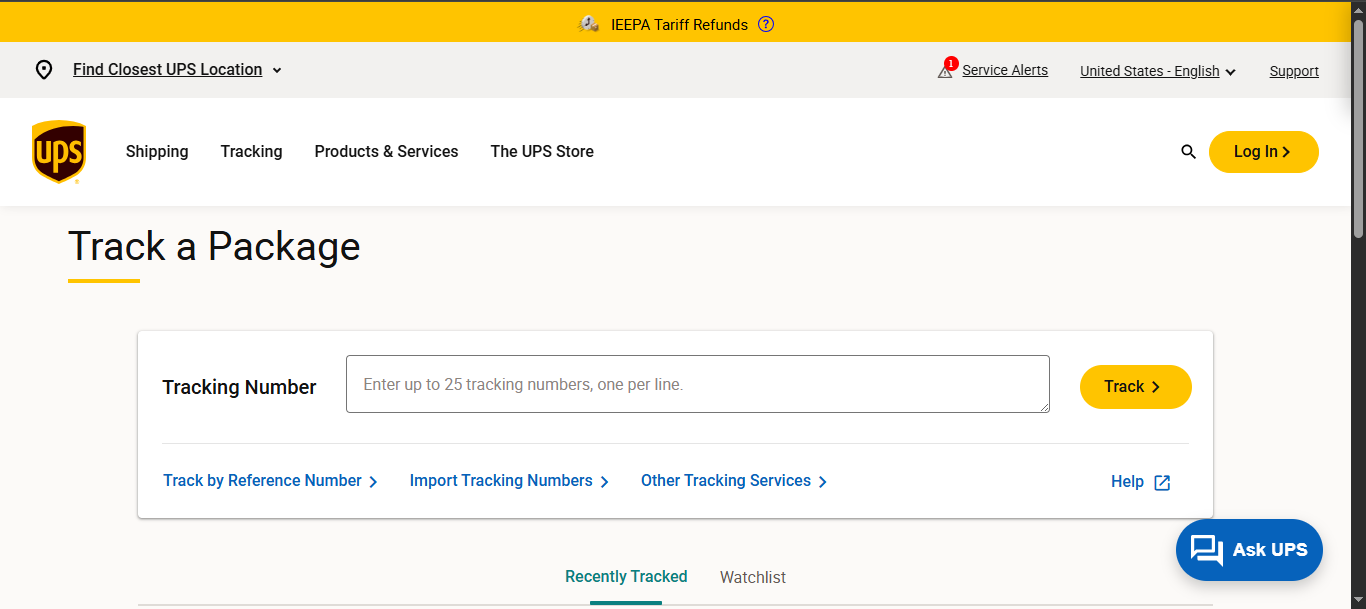
This is the most direct method. Go to the UPS tracking page, paste your tracking number into the search field, and hit track. You will see the current status, a full scan history, the estimated delivery date, and (when available) delivery photos or signature confirmation.
2. The UPS Mobile App
The app mirrors what you get on the website but adds a barcode scanner, so you can scan a label directly instead of typing the number.
It also supports push notifications for status changes, which is useful if you would rather not keep refreshing a browser tab.
3. UPS My Choice
If you sign up for a free UPS My Choice account and link it to your delivery address, UPS will automatically surface incoming packages addressed to you, even before you have the tracking number in hand.
My Choice also unlocks delivery planning features like choosing a delivery window, rerouting a package to a UPS Access Point, or leaving delivery instructions for the driver.
4. Track by Reference Number
No tracking number yet? UPS also offers Track by Reference, which searches using an order number, shipment date, and destination ZIP code instead.
This only works if the shipper attached that reference to the label when it was created, so it is more reliable for business shipments with structured order systems than for random personal packages.
5. At a UPS Store or Access Point
Staff at a physical UPS location can look up a shipment for you if you bring in the tracking number or the original receipt.
6. Third Party Tracking Tools
Independent tracking sites, such as 17Track can also pull UPS scan data, and some are useful if you are juggling packages from multiple carriers and want one dashboard instead of separate searches on UPS.com, USPS.com, and others.
Understanding UPS Tracking Statuses
Once your number starts returning results, you will see a primary status along with a detailed scan history underneath it. Here is what the most common statuses actually mean:
- Label Created – UPS has received electronic information about the shipment, but the physical package has not yet been scanned into the network. This can sit unchanged for a day or two if the sender created the label before actually handing the package to UPS.
- Shipped / On the Way – The package has been picked up or dropped off and is actively moving through UPS facilities.
- Arrived at Facility / Departed Facility – Standard scans that show the package passing through UPS sorting hubs on its route.
- Out for Delivery – The package is on a delivery vehicle for that day. UPS drivers can deliver as late as 9 p.m., and even later during peak holiday periods, so a package that is out for delivery in the morning may not arrive until evening.
- Delivered – The package has reached its destination. Some deliveries include a photo or signature as proof.
- Delivered to a UPS Access Point – Used when the package is redirected to a nearby pickup location instead of the original address.
- Transferred to Post Office for Delivery – Common with UPS SurePost and Mail Innovations shipments, where UPS handles the middle leg and USPS completes the final delivery.
- Exception – Something interrupted the normal delivery flow. This is a catch all status, so it is worth opening the detailed tracking view to see the specific reason, which is often tied to an address problem, weather delay, customs hold, unpaid duties, or a missed access window at the delivery location.
International Tracking Statuses
Cross border shipments show a few extra statuses tied to customs. An Export Scan typically appears within a day or two of pickup and confirms the package has officially left the origin country.
Import scans, customs clearance updates, and duty or tax notices show up as the package enters the destination country.
These steps can slow down the overall timeline, and it is normal for updates to arrive less frequently while a package sits in customs processing.
RFID Sensors and What They Change
UPS has been expanding RFID based package sensing across parts of its US small package network. Sensors installed in vehicles and facilities pick up eligible packages as they move past checkpoints, adding extra tracking events on top of traditional manual scans.
This can make tracking history more detailed for eligible shipments, but it does not mean every package has continuous live GPS tracking. Between scans and sensor events, a package can still be in transit even if the tracking page has not updated in several hours.
Tracking Without a Tracking Number
If a tracking number is not available, you still have a few options:
- UPS My Choice automatically detects incoming packages tied to your address, no tracking number needed on your end.
- Track by Reference works if the shipper included an order number, PO number, or similar reference when creating the label.
- InfoNotice numbers from a missed delivery slip can be entered just like a standard tracking number.
- Contacting the sender directly is usually the fastest fix if none of the above apply, since only the shipper’s system holds the original tracking number.
Common Tracking Problems and How to Fix Them
“Invalid tracking number” message. This almost always means the number was typed incorrectly, is missing a character, or belongs to a different carrier entirely.
Double check that it starts with 1Z (for standard shipments) and contains exactly 18 characters, watching closely for characters that are easy to confuse, like the letter O versus the digit 0, or a capital I versus the number 1.
Tracking number does not show any results yet. New shipments can take anywhere from 2 to 24 hours to appear after the label is first created, especially if the package was shipped late in the day or over a weekend. This delay does not mean anything went wrong.
No new scans for a long stretch. A gap in scan history does not automatically mean a package is lost. It can still be moving between facilities, especially with RFID enabled routes where not every checkpoint produces a manual scan.
If there has been no movement for several days past the expected delivery date, that is the point to contact UPS directly or start a formal investigation.
Package shows delivered but is not there. File a claim through UPS if a package is marked delivered but cannot be located, arrives visibly damaged, or has gone unusually long without any scan activity. UPS will investigate and follow up on next steps.
Tracking data disappeared. UPS keeps tracking information available online for 120 days from the delivery date. After that window, the details are archived and no longer accessible through the standard tracking page, so UPS customer service is the next step for anything older.
Frequently Asked Questions
Does checking my tracking number more often speed up delivery? No. Tracking only reflects the shipment’s current status and does not influence how quickly it moves. A faster delivery speed has to be selected at checkout when the label is first created.
How long is a UPS tracking number valid? Tracking history stays available online for 120 days after delivery. After that, you would need to contact UPS support directly for older shipment records.
Can one order have multiple tracking numbers? Yes. If an order ships in more than one box, each package usually receives its own separate tracking number, even though they all belong to the same purchase.
How do I know if a tracking number is fake? Legitimate UPS tracking numbers follow the known formats described above, most commonly the 18 character 1Z format. If a number does not match any recognized UPS pattern, or the UPS site cannot find any record of it, treat it with suspicion, particularly if it arrived through an unsolicited email or text link.
What is the difference between “Out for Delivery” and “Delivered”? Out for Delivery means the package is currently on a delivery vehicle and expected that day. Delivered confirms it has actually reached the destination, sometimes with a photo or signature attached as proof.
Final Thoughts
A UPS tracking number carries more information than it looks like at first glance, from the shipper’s account details to the exact service level used.
Once you know how to read it and where to enter it, whether that is UPS.com, the mobile app, My Choice, or a reference number search, staying on top of a delivery becomes far less stressful.
When tracking does stall or throw an error, the fixes are usually simple: double check the number, give it time to populate, or reach out to UPS or the sender directly if a package genuinely appears to be missing.