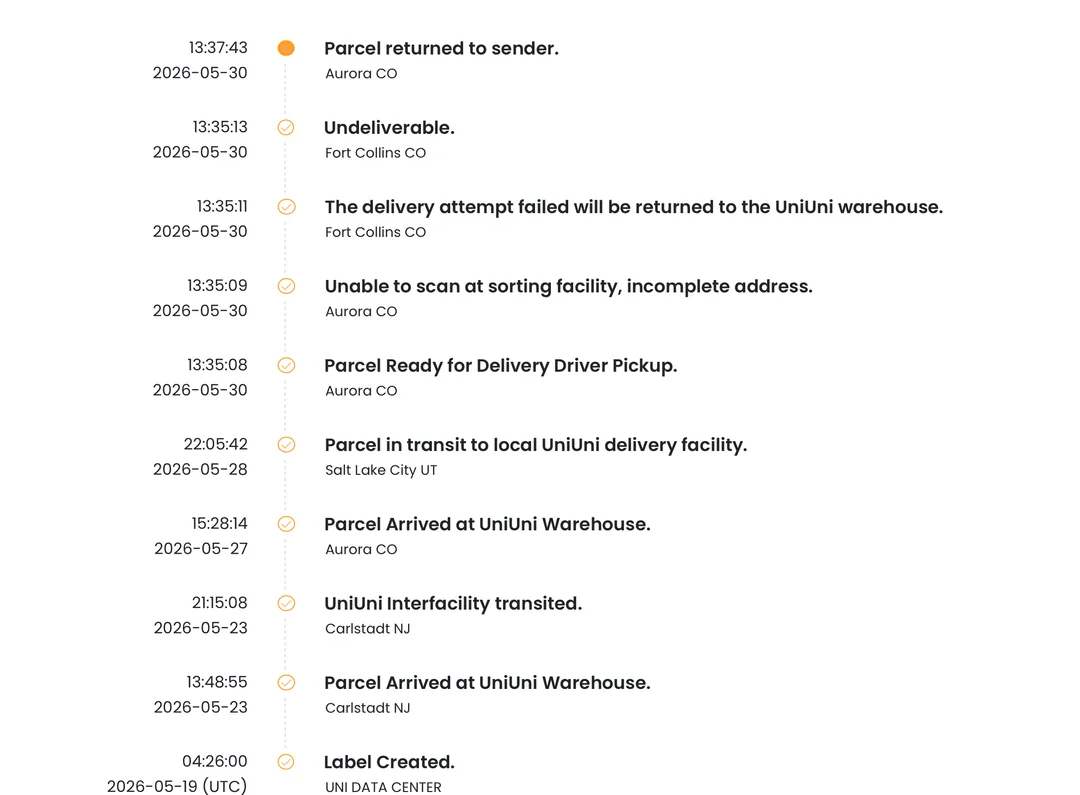
If you have ever placed an order that shipped through UniUni, you already know the feeling. You get a tracking number, click on it, and are met with a status message that sounds like it was written for a warehouse computer instead of a person waiting on a package.
This guide breaks down the UniUni tracking statuses you are likely to see, what each one actually means, and what to do when the tracker seems to stop moving.
What Is UniUni?
UniUni is a last-mile delivery company that specializes in e-commerce logistics across Canada and the United States.
Rather than being a carrier you book directly, UniUni typically works behind the scenes as a shipping partner for online marketplaces, small businesses, and international sellers.
If a store you ordered from uses UniUni for fulfillment, you will receive a UniUni tracking number automatically once your order ships.
Tracking numbers usually appear in one of a few formats:
- Numbers starting with “UNI” followed by a string of digits
- Numbers starting with “UU” for standard e-commerce shipments
- Numbers starting with “UUS” for domestic lanes in Canada and the United States
- A 12 digit numeric sequence used by some logistics partners
Any of these formats can be entered directly on the UniUni tracking page or on a third party tracker to see live updates.
The Full List Of UniUni Tracking Statuses
Gateway Transit In
“Gateway transit in” means your package has just arrived at one of UniUni’s major sorting hubs, often a large regional gateway facility near a big metro area.
This is the point where the parcel enters UniUni’s network for processing, getting scanned in and sorted alongside thousands of other packages before being routed toward your local delivery area.
It is completely normal for this status to sit unchanged for a day or two, and sometimes up to five to seven days during busy periods, since the package is being queued and sorted rather than lost.
Once sorting finishes, the next update you should expect is “gateway transit out,” which confirms the package has left that hub and is heading toward the facility closest to you. Read the full meaning here.
Label Created / Shipment Information Received
This is the very first status you will see, and it simply means the seller has generated a shipping label and sent shipment details to UniUni.
The physical package has not been picked up yet. This status can sit unchanged for a day or two while the seller finishes packing and prepares the parcel for pickup, so there is no need to worry if nothing moves right away.
Package Picked Up / Received By Carrier
This confirms UniUni has physically taken possession of your package from the seller’s warehouse. Your parcel has officially entered the UniUni delivery network, and the countdown to delivery has effectively started.
In Transit
Your package is moving between UniUni facilities, typically traveling from a regional sorting center toward the local hub closest to your delivery address.
This status can last anywhere from a day to several days depending on distance and how many facilities the package needs to pass through. We have expounded about it.
Arrived At Facility
The package has reached a UniUni processing center for sorting. From here it will either be routed to another facility or prepared for local delivery.
Gateway Transit Out
This means the package has left a regional sorting hub and is now heading toward the delivery facility nearest your address. It is a positive sign that your parcel is getting closer to the final stretch. Read more here.
Scanned Parcel Processing Delay
This status means your package was scanned at a UniUni facility but ran into a hold up during internal processing before it could move to the next stage of its journey.
It does not mean the package is lost or that delivery has failed. It simply signals that something in the sorting or handling workflow, such as a backlog at the facility or a scan that needs manual review, is holding the parcel back temporarily.
In most cases the status updates again within a day or two once the facility works through the delay. If it persists longer than that, it is worth reaching out to UniUni support or the seller with your tracking number for a closer look.
Interfacility Transited
A newer status that confuses a lot of shoppers the first time they see it. It simply means the parcel has moved between two UniUni facilities while in transit. Nothing has stalled, and the package has not been lost.
In Transit, Arriving Late
This status shows up when a shipment is still moving through the network but has passed its original estimated delivery date.
It does not mean your package is lost. Common causes include severe weather, high shipping volume during busy sales periods, congestion at sorting facilities, customs inspections on cross border shipments, or general transportation delays. In most cases the status updates again once the package reaches its next facility.
Driver Sorting
At the local depot, packages get grouped by postal code before being handed to a driver for delivery. If there happens to be a shortage of available drivers for your area on a given day, your tracking status may not move until a driver is assigned to your route.
Out For Delivery
Your package has arrived at the final delivery depot, been loaded onto a delivery vehicle, and is now on its way to your address. This almost always means delivery will happen the same day. Read the ultimate guide.
Delivery Attempted
The driver tried to deliver your package but was unable to complete it, whether because no one was available to receive it, the location was inaccessible, or another issue came up. UniUni will typically schedule another delivery attempt or leave instructions for pickup.
Delivered To Agent
This means your package was handed to an authorized third party who can legally accept deliveries on your behalf.
This is common in apartment buildings and office complexes, and could mean a receptionist, building manager, security guard, or mailroom staff signed for the parcel. If you see this status but cannot locate your package, check with building management or reception first.
Misrouted
Occasionally a package gets accidentally sent to the wrong warehouse or city during sorting. When this happens, UniUni forwards it through the correct channel, sometimes handing off to a national postal service to complete the final delivery. This is handled automatically and does not require any action from you.
Delivered
Your package has been successfully dropped off at the intended address. Many delivered statuses include a photo confirmation or specific location details, such as which door or area the package was left at.
Why UniUni Tracking Sometimes Goes Quiet
One of the most common frustrations with UniUni tracking is watching the status sit unchanged for days at a time. This usually happens for one of a few reasons.
First, there is often a gap between when a label is created and when UniUni physically receives the package.
During this window the seller may still be preparing the order, and UniUni has no update to give because the parcel has not reached them yet.
Second, UniUni operates across more than 100 facilities and processes an enormous volume of parcels daily.
Not every handoff between trucks or facilities triggers a scan. Your package can be moving perfectly normally on a truck between two hubs while the tracker shows nothing new for 24 to 72 hours. This kind of quiet period is considered normal, especially during busy shipping seasons.
What To Do If Your UniUni Tracking Is Not Updating
If your status has been stuck for several days, work through these steps before assuming something has gone wrong.
- Wait at least 24 to 48 hours before assuming there is a real problem, since scan gaps between facilities are common
- Confirm the tracking number was entered correctly and matches the one from your shipping confirmation email
- Contact the seller directly if there is no movement at all, since the delay may simply be on their end before the package reaches UniUni
- Check the official UniUni tracking page directly in addition to any third party tracker, since results can occasionally differ
- Reach out to UniUni support with your tracking number if the package has been stuck well past the estimated delivery date
What If UniUni Says Delivered But You Cannot Find The Package
This happens more often than you might expect, and it rarely means the package is actually lost. Start with these steps.
- Refresh the tracking page to confirm the status truly says delivered
- Check for a delivery photo or specific drop off location noted in the tracking details
- Look around entrances, mailbox areas, parcel lockers, the lobby, garage, or side doors
- Ask neighbors, roommates, or building staff if they accepted the package on your behalf
- Contact UniUni support directly if the package still cannot be located
- Contact the seller as well, since refunds and replacements for missing deliveries are usually handled at the marketplace or seller level
How Long Does UniUni Delivery Usually Take
Domestic deliveries within Canada typically complete within 1 to 5 business days. Cross-border shipments between the United States and Canada tend to take a bit longer, since customs clearance and international transit add extra steps to the process.
Estimated delivery dates are only available once UniUni has physically received the package from the seller, so if your order shows no ETA yet, that usually means it is still sitting with the seller rather than with UniUni.
Final Thoughts
UniUni tracking statuses are accurate at the moment a scan happens, but the system goes quiet between those checkpoints more often than shoppers expect.
Understanding what each status actually means, and knowing which quiet periods are normal versus which ones need a follow up message to the seller or to UniUni support, takes most of the stress out of watching a package move through the network. Bookmark this guide so the next unfamiliar status on your tracking page is one less thing to worry about.