Waiting on a FedEx package is a small daily ritual for millions of people. You refresh a tab, you glance at a text message, you wonder whether “in transit” actually means the truck is two streets away or two states away.
The good news is that FedEx tracking by tracking number is one of the most transparent systems in the shipping industry once you know how to read it.
This guide walks through everything tied to that string of digits on your label: where to find it, every way you can use it to track a shipment, what each status actually means, and what to do when the tracker seems to freeze or throws up a delivery exception.
What Is a FedEx Tracking Number
A FedEx tracking number is a unique identifier assigned to a shipment the moment a label is created. It links your package to a digital record that updates every time the box is scanned, from pickup through sorting facilities to the final delivery vehicle.
Enter that number into the tracking tool, and FedEx pulls up the entire scan history along with an estimated delivery window.
The tracking number will mostly have 12 to 15 digits, especially for FedEx Ground and Express shipments, though in some rare cases the format can stretch to 20 to 22 digits.
Standard FedEx tracking numbers commonly appear as a straightforward 12-digit code with no letters.
FedEx SmartPost returns work a little differently, since the return tracking number typically runs 20 digits, starting with 023 for standard Intelligent Mail package barcode labels or 58 for non-IMpb barcodes.
There is no single universal prefix. FedEx tracking numbers do not follow one fixed starting sequence and can begin with a wide range of number combinations depending on the service used.
That is normal. If the tool recognizes the number, it will tell you which FedEx service it belongs to automatically.
Where to Find Your FedEx Tracking Number
You will usually find your tracking number in the shipment confirmation email, printed on your FedEx receipt, or listed on the order confirmation page of the online store where you made your purchase. A few other common locations:
- The shipping label itself, printed directly above or below the barcode
- The confirmation screen or emailed receipt if you shipped the package yourself at a FedEx location
- A text or push notification if you signed up for delivery alerts on a previous shipment tied to the same phone number
- Your account order history on the retailer’s website, usually under “track this order”
If none of these apply and you are the recipient rather than the sender, ask the shipper for the number or reference ID connected to your order.
FedEx Tracking by Tracking Number Process
Step 1: Go to the official tracking page
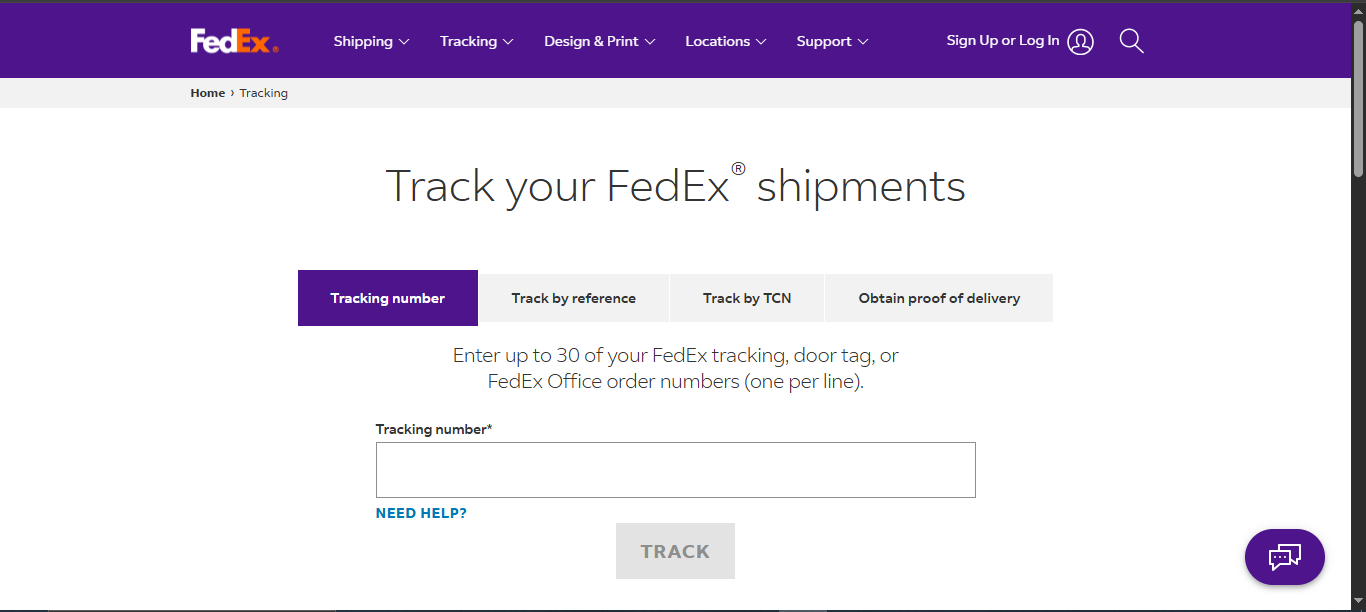
Open the FedEx tracking page and locate the search field at the top. You can enter your FedEx tracking number, track by reference, obtain proof of delivery, or use a Transportation Control Number, and the tool covers FedEx Express, Ground, Freight, and Custom Critical services.
Step 2: Enter the number correctly
Type or paste the digits exactly as they appear on your label or confirmation email. Spaces usually do not matter, but double-check for a mistyped digit if the system cannot find your shipment.
The tracking page lets you check the progress of your shipment along with the estimated delivery date and time, and you can track up to 30 packages at once by entering individual tracking or reference numbers.
Step 3: Read the tracking history
Once the record loads, you will see the current status at the top, followed by a timeline of scan events starting from label creation. Each entry includes a location, a timestamp, and a short description of what happened at that checkpoint.
Step 4: Use map view and delivery windows if available
If an estimated delivery time window is available, you can watch the package’s journey in map view so you know roughly when to expect it, and picture proof of delivery lets you confirm exactly when and where a package was left.
FedEx also provides GPS coordinates showing the nearest location where the package was marked delivered.
Other Ways to Track a FedEx Package Besides the Website
The tracking number is the key that unlocks every one of these methods, not just the website search bar.
FedEx Mobile app
The FedEx Mobile app is one of several ways to check the status of a shipment beyond a phone call to customer service.
It delivers notifications, delivery alerts, and picture proof of delivery directly to your phone.
Text message tracking
You can text the word follow along with your door tag number to 48773 to receive updates. This is especially handy if a driver leaves a door tag notice while you were out.
Email tracking
Compose a new email to track@fedex.com, leave the subject line blank, and type your tracking number or numbers in the body of the message.
You can include up to 30 tracking numbers in a single email, either separated by a comma and space on one line or listed one per line.
If you are tracking by account and reference numbers instead, type “account” followed by a space and your FedEx account number, keeping each email limited to a single account number.
Phone and voice assistant
Call 1.800.GoFedEx (1.800.463.3339) and simply say “track my package” to be routed to your shipment status.
FedEx Delivery Manager
FedEx Delivery Manager lets you sign up for free to get real-time updates and receive notifications about your package status through email or text message.
The same tool also lets you redirect a package to a new address while it is in transit, schedule a different delivery time, or request that a package be held at a FedEx location for pickup, though a redirect may carry a fee.
FedEx InSight for businesses
FedEx InSight is a free web based tool that lets registered users proactively monitor all inbound, outbound, and third party shipments billed to their account, without needing an individual tracking number for every package.
It also supports search by tracking number, customer reference, or door tag number, along with downloadable reports for further analysis.
On the standard tracking tool, expedited shipments can be tracked by reference number and standard shipments can be tracked by reference, purchase order, or invoice number.
Third-party Tracking Sites
Beyond FedEx’s own tools, several third-party tracking aggregators let you look up the same tracking number and see consolidated results.
Sites like 17TRACK let you enter your FedEx tracking number, and if you have several shipments, you can enter them all at once separated by commas, spaces, or one per line, then view the current status, location history, and expected delivery date in one place.
Similar services such as Parcelsapp and Pkge.net work the same way, and Parcelsapp specifically pulls package data from multiple Chinese delivery companies as well, which is useful if a shipment starts overseas before it enters FedEx’s own network.
These tools do not replace FedEx as the source of truth, since they are simply reading the same tracking data through FedEx’s public systems, but they can be convenient if you are already tracking multiple packages from different carriers and want a single dashboard instead of checking each carrier’s site separately.
Tracking Without a Traditional Tracking Number
Not every situation gives you the 12-digit code right away. FedEx built several workarounds:
- Door tag number: Door tag numbers start with the letters DT followed by 12 numbers, and you can enter up to 30 door tag numbers at a time as long as each one is on its own line. A door tag lets you know FedEx either successfully delivered the package and where it was placed, or attempted delivery and could not leave it for a specific reason.
- Reference number: Useful for shippers and businesses managing many orders at once, since the reference is often the internal order or invoice ID rather than a carrier-generated string.
- Transportation Control Number (TCN): Government shippers use their Transportation Control Number specifically to track shipments moving through federal or military logistics channels.
- Account-based tracking through InSight: As noted above, this removes the need for individual tracking numbers entirely for high volume shippers.
What Every FedEx Tracking Status Means
FedEx scans a package at nearly every checkpoint, and each scan updates the status shown on your tracking page. Here is what the most common ones mean.
Label Created. A shipping label has been generated but FedEx has not yet physically scanned the package into its network. This simply means the process has started; it does not confirm the package has been picked up.
Picked Up / In Transit. Your package is moving toward its final destination, which means it is either inside a moving vehicle or sitting at one of FedEx’s sorting facilities. There is nothing you need to do at this stage.
Out for Delivery. Your package has been scanned and loaded onto a vehicle for delivery that same day, and you can check the tracking page for an estimated delivery window.
Delivered. The package has reached its destination. FedEx typically attaches proof, whether that is an image of the recipient’s signature, a copy of the FedEx Freight Bill of Lading, or another delivery document depending on the service used.
Delivery Exception. This means the package is temporarily delayed due to unavoidable circumstances such as extreme weather, a natural disaster, or similar conditions, and it does not necessarily mean the shipment will now arrive late.
Common causes include a customs delay, bad weather, strikes, a recipient who was not home, or a security restriction, and there is generally nothing you need to do right away.
Delivery Updated. A change was made to the delivery date or address, either because the shipper or recipient requested it, or because of an exceptional event such as a prohibited item or a package exceeding weight or size limits.
Returning to FedEx Facility. This happens when a package is sent back to a FedEx location after a delivery attempt, often because the recipient turned it away for reasons like visible damage or an inability to pay a delivery fee, at which point FedEx contacts the shipper to decide next steps.
Running Late. The package is delayed and likely will not arrive within its original estimated window, which can result from higher than normal shipping volumes, dangerous weather, a vehicle breakdown, or local security restrictions.
Understanding Delivery Exceptions in More Detail
A delivery exception is the status that causes the most anxiety, mostly because the wording sounds more serious than it usually is.
In most cases FedEx will attempt redelivery the next business day, and if any action is required on your part the tracking page itself will say so directly.
Common triggers include:
- Address problems. If the delivery address is incorrect or incomplete, FedEx cannot complete the delivery, and the package will be held or returned until FedEx receives the correct details.
- Damaged or unreadable labels. If the label on a package is damaged, FedEx prints a new one and replaces the old one, and the package continues its normal transit afterward.
- Weather delays. Local weather along a specific delivery route can delay a delivery attempt, and by default FedEx reattempts delivery once conditions allow.
- Recipient unavailable or business closed. FedEx’s standard delivery hours run Monday through Friday between 8 a.m. and 8 p.m., and drivers may decide not to leave a package unattended if they are not comfortable doing so, in which case delivery is reattempted the next business day.
- Customs holds on international shipments, which pause the package until documentation clears.
FedEx generally makes three consecutive delivery attempts, excluding weekends and major holidays, before returning a package to the sender.
If your package sits on an exception status for more than a day, checking the sub reason listed directly on the tracking page will usually explain the specific cause and next step.
Why Your Tracking Might Not Be Updating
Every tracking update comes from a scan at a physical checkpoint rather than a live GPS signal, so gaps between updates are completely normal, especially overnight and on weekends.
If tracking has not updated in 24 to 48 hours, the package is most likely moving between facilities without having triggered a new scan yet.
A Label Created status that stalls is one of the more common sources of confusion. This simply means the package has not yet been scanned into the FedEx network, either because it has not been dropped off or because the first scan at pickup was missed, and it is the status that tends to generate the most premature “where is my package” concerns.
Give it a business day before assuming something is wrong, particularly if the label was created over a weekend or holiday.
How Long Tracking Information Stays Available
FedEx keeps tracking information available for 90 days after delivery for Express, Express Freight, Ground, and Custom Critical shipments, while FedEx Freight shipment information stays accessible for two years after delivery.
If you need proof of delivery for a return, warranty claim, or expense report, it is worth saving a screenshot or downloading the record before that window closes.
What to Do If Your Package Is Lost or Tracking Is Stuck
If a delivery exception lingers well past its expected resolution, or tracking has gone silent for several days with no plausible explanation, it is time to escalate.
- Call FedEx customer support directly rather than relying only on the automated tracker.
- File a claim through the FedEx website or contact customer service, and be ready to provide relevant details including the tracking number and shipping date.
- Be prepared to submit documentation such as proof of shipment and value for insurance purposes if your claim moves forward.
- If you are the recipient rather than the shipper, loop in the original sender, since some claims and address changes can only be initiated by the account that created the label.
Tracking International FedEx Shipments
International tracking works the same way at its core: enter the tracking number and follow the scan history. The main difference is that international shipments pass through customs checkpoints, which can add scan events and occasional exception statuses tied to documentation review rather than anything wrong with the package itself.
Give customs-related exceptions a little extra patience compared to a domestic delivery exception, since clearance timelines depend on the destination country’s own processes rather than FedEx alone.
Frequently Asked Questions
How many digits does a FedEx tracking number have? Most FedEx Ground and Express tracking numbers run 12 to 15 digits, though some formats extend to 20 or 22 digits. FedEx SmartPost returns commonly use a 20 digit format.
Can I track a FedEx package without a tracking number? Yes. You can track by reference number, door tag number, or Transportation Control Number, and businesses can use FedEx InSight to monitor shipments tied to their account without entering individual numbers at all.
What does it mean if my FedEx tracking says delivered but I do not have my package? Check the picture proof of delivery and GPS coordinates on the tracking page first, since packages are sometimes left in a different spot than expected, such as a side door or a building’s mail room. If you still cannot locate it after checking those details, contact FedEx directly.
How many delivery attempts does FedEx make? FedEx generally makes three consecutive delivery attempts, excluding weekends and major holidays, before returning a package to the sender.
Is a delivery exception the same as a lost package? No. A delivery exception does not always mean a significant delay, and in most cases FedEx can resolve the underlying issue fairly quickly. It only becomes a concern for a lost package if the exception persists for several days without any further movement.
Final Thoughts
FedEx tracking by tracking number is straightforward once you know the number’s format, where to enter it, and how to interpret the status language FedEx uses along the way.
Between the website, the mobile app, text and email tracking, and business tools like Delivery Manager and InSight, there is a tracking method suited to almost any situation, whether you are waiting on a single package or managing shipments at scale.